$0
For a first cleanup.
- 1 connected source
- 500 files scanned/month
- Exact duplicate matching
- Manual review queue
 RAVEN SHARPAI File Manager
Compare content and versions, review duplicates and possible older or partial drafts, get recommendations on what to keep, and turn generic filenames into meaningful names.
Finds duplicate photos even when resized or recompressed, and near-identical drafts of documents — not just exact filename matches.
Claude Vision can compare connected cloud images, while Claude compares extracted document text. When content inspection is unavailable, recommendations use other file details; review the evidence before deciding.
"IMG_4821.jpg" becomes a real, descriptive name based on what's actually in the photo or document.
Scan Google Drive, Dropbox, and your device's photos and files together, instead of cleaning each source separately.
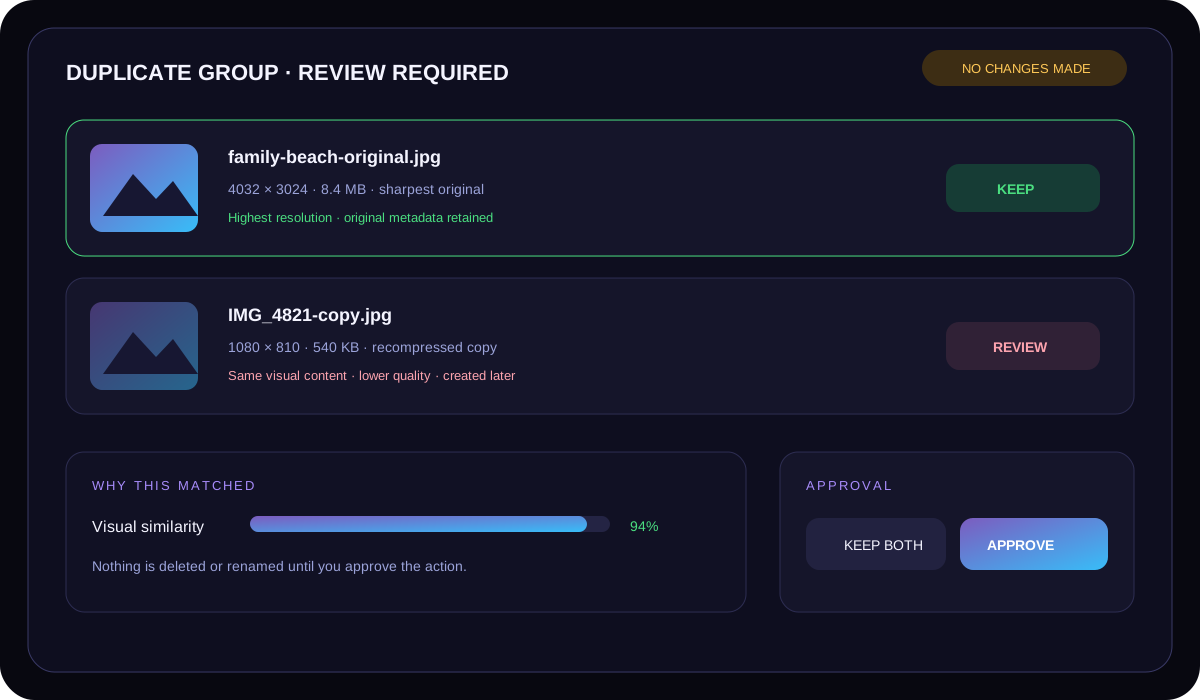
AI File Manager groups matching content, explains which file is strongest and suggests clearer names. Review every suggestion; device originals stay unchanged.
Prices in AUD. Start free, cancel anytime and keep final control over every action.
For a first cleanup.
For ongoing personal cleanup.
Use the web app on your PC or phone. Choose files, photos or a supported folder in your browser.
Find duplicate and near-duplicate files by content, compare versions safely and keep the strongest copy with the user in control.
Free browser access and Pro at A$9/month. Start free and upgrade only when it suits your workflow.
Yes. A free option is available so you can explore the workflow first.
No. Important output and account actions remain under your control.
It is one of six focused Raven Sharp tools, linked below.